Archives page

Posts Tagged ‘technology’

Executing complete (Iron)Ruby scripts from within native C# / .NET

Running Ruby code as-is within .NET is almost too simple to even write home about. In fact I almost didn’t, but after I wrote it the solution stared up at me with its big brown eyes, and I couldn’t resist. I’m not totally sure when I’d ever need to use this, but perhaps taking some legacy Ruby scripts where I don’t really care about the results, and still want to run them amongst some other .NET tasks. It might come up in some obscure unit testing one day. You never know.

So, this still serves as an example of how simple it can be to run ruby scripts within .NET. We’ll get to making use of some return values, and running individual methods in the next post.

Following on from the last example, the following ruby script prints all the prime numbers between 1 and 50.

[codesyntax lang=”ruby”]state = Numeric.new
print “2,3,”
(4..50).each do
|i|
(2..(Math.sqrt(i).ceil)).each do
|thing|
state = 1
if (i.divmod(thing)[1] == 0)
state = 0
break
end
end
print “#{i}\,” unless (state == 0)
end
[/codesyntax]

With the ruby script complete (you can also run this with the ir.exe that ships with IronRuby if you like)… Next start up a new project within Visual Studio, and add some references from your downloaded IronRuby bin folder (IronRuby.dll, IronRuby.Libraries.dll etc…).

You only need a few lines of code to execute your ruby script.

[codesyntax lang=”csharp”]using IronRuby;
// ..
var runtime = Ruby.CreateRuntime();
runtime.ExecuteFile(@”ruby/run.rb”);
[/codesyntax]

As before, you can download the full example to check it and run for yourself. And also as before, you will also need IronRuby.


Using C# / .NET libraries within IronRuby

I attended my first VistaSquad meeting on Wednesday. Part of the evening was a very interesting talk from @ben_hall on IronRuby, which among many other things included how to use any .NET CLR libraries direct from your IronRuby script (running via the .NET DLR).

Whilst my example below is extremely trivial, it shows how you might make use of any existing libraries within your Ruby scripts. This same technique applies to any .NET libraries, whether they’re custom, part of the framework, or created by your gran. I don’t think I really need to sell it in – but I love the flexibility that this provides.

So to get to the example, this simple piece of C# displays all the prime numbers between 0 and maxNumber:

[codesyntax lang=”csharp”]public int[] DisplayPrimeNumbers(int maxNumber)
{
int max = maxNumber;
List previousPrimes = new List();
previousPrimes.Add(2);
if (max < 2) return null; // none for (int i = 3; i <= max; i++) { int maxDivisor = (int)Math.Floor(Math.Sqrt(i)); bool foundDivisor = false; for (int j = 0; j < previousPrimes.Count; j++) { if (previousPrimes[j] > maxDivisor) break;
if ((i % previousPrimes[j]) == 0)
{
foundDivisor = true;
}
}
if (!foundDivisor)
{
previousPrimes.Add(i);
}
}
return previousPrimes.ToArray();
}
[/codesyntax]

We can build that up into a class library and using IronRuby, manipulate the return of the method the same as though we had been running native ruby.

[codesyntax lang=”ruby”]require ‘mscorlib’
require ‘CSharpLib, Version=1.0.0.0, Culture=neutral, PublicKeyToken=null’;

prime_numbers = CSharpLib::PrimeNumbers.new

(prime_numbers.DisplayPrimeNumbers 20).each do |num|
puts num
end
[/codesyntax]

You can download the full sample below, a C# console app is also included for completeness (although isn’t a part of the IronRuby process). You will of course, need to download IronRuby first, and add the installed bin/ folder to your path. Then just change to the <sample>/ruby/ directory, and run it with:

ir run.rb

It’s probably worth noting that IronRuby is still a way off from a 1.0 release, but it’s already very usable and looking rather cool. Since it’s on my recent //TODO list, I’ll be doing a few more examples here – next time turning this one its head and executing your ruby scripts from within C#. In the meantime, you can check out Ben’s set of slides from Wednesday on Slideshare.

//TODO: Learn, play, discuss.

Somewhat inspired by Mike Taulty’s blog, I’ve decided I should throw my Tech TODO list at the world, because it might encourage / guilt me into doing some of them, as well as provide a preview on what this blog might be including over the next few months.

So all of these are technologies, packages, or platforms I want to be checking out in the not-to-distant future.  In no particular order, they’re bound to be added to as I go and quite possibly ignored as well.

  • .NET
    • ASP.NET MVC
    • ADO.NET Data Services
    • F#
    • IronRuby
    • Open-sourcing a simple XML resource provider (CodePlex)
    • .NET 4
      • Windows Communication Foundation
      • Entity Framework
      • Parallel Extensions
  • Gallery3
    • Module development
      • Migrate Twitter module
      • Migrate auto-GPS-tagging module
    • Theme development
  • Google Wave

Gallery2 remote API C# wrapper

I stumbled across the Gallery.NET Toolkit on Twitter, while I should have been doing something more useful; some great work from @rmaclean (thanks for sharing / codeplexing  it).

The API wraps up a lot of the Gallery2 remote services into some easy to use C# functions.

[codesyntax lang=”csharp”]Actions a = new SADev.Gallery2.Protocol.Actions(“http://www.blakepics.com”);
string authToken = a.Login(“*************”, “*************”).AuthToken;
a.FetchAlbums(authToken).Albums.ForEach(
album =>
{
Console.WriteLine(album.Title);
a.FetchImages(authToken, album.Name).Images.ForEach(image =>
Console.WriteLine(“\t” + image.Url)
);
}
);
Console.ReadKey();[/codesyntax]

Hopefully I’ll find an excuse to use this one day.

GalleryTweet – Twitter for your Gallery2

This post is no longer being maintained due to budget constraints - please check the project page for the latest information: http://codex.gallery2.org/Gallery2:Modules:gallerytweet

I’m releasing the updated module for Gallery2 under the name of GalleryTweet. It was prompted by a few people mentioning they couldn’t get my earlier hack to work – so I thought I’d build something that was (slightly) more robust, and might stand to work on installations other than my own.

You might want to skip my ramblings and jump straight to the download, so here’s a link for you folks:

  1. Install by unzipping to the root of your Gallery2 installation, and activate through the plugins panel.activate
  2. Once logged in, edit your Twitter settings through the left navigationmenu
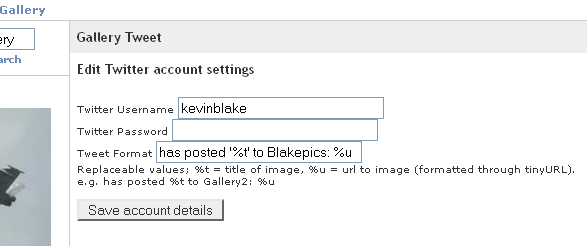
  3. You should enter your twitter username / password, and the format you’d like to send your Tweets out with.twitter-settings
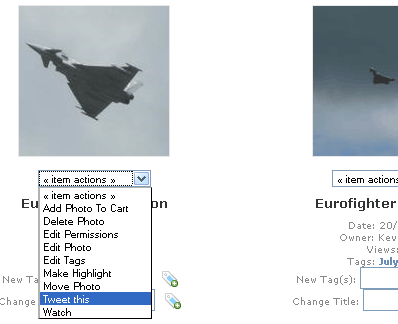
  4. Now while you’re browsing the Gallery, Tweet about any images using the link below the thumbnailtweet

Please drop me a message on Twitter @kevinblake if you’ve found the plugin useful, can’t get it work, or have any other feedback.  That download link again, in case you missed it the first time:

Happy Tweeting!

This post is no longer being maintained due to budget constraints - please check the project page for the latest information: http://codex.gallery2.org/Gallery2:Modules:gallerytweet